Strategy: your GTM Brief, ICPs, personas, and messaging
Strategy is the single operating surface for your go‑to‑market plan — "clear enough to act on, structured enough to scale." It's one continuously‑scrolling page broken into five numbered sections, listed in a sticky Strategy Contents panel on the left.
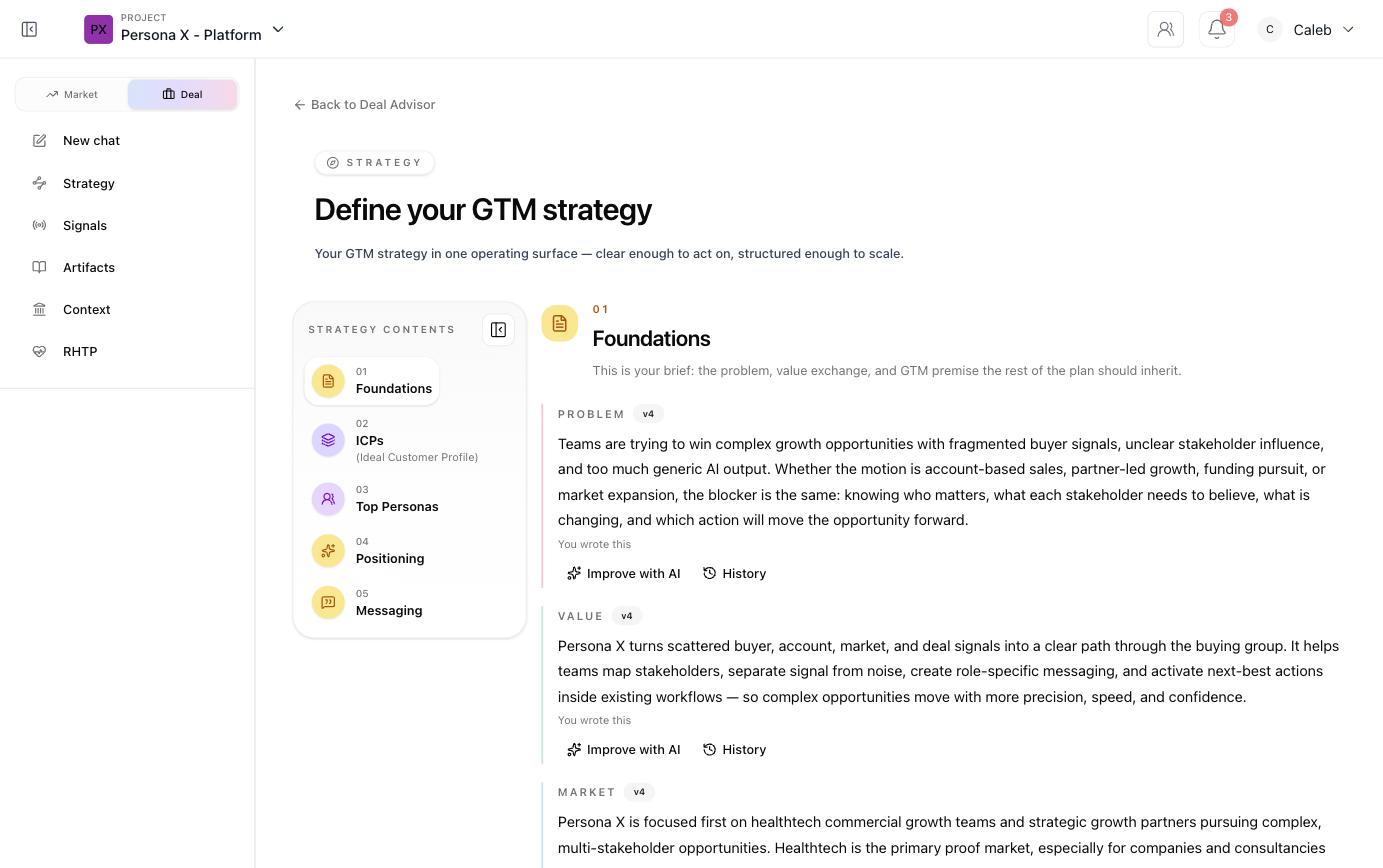
01 — Foundations (the GTM Brief)
Foundations is your brief: the problem, value exchange, and GTM premise the rest of the plan inherits. It has four written blocks plus two tags:
- Problem — the challenge your target customers face, why it matters, and the business impact if it stays unsolved.
- Value — what you offer, why it's different, and the specific benefit customers get.
- Market — your target segment and how you're prioritizing it.
- Industry and Business model tags (e.g. SaaS / Software, B2B).
Every block is versioned (v1, v2…), shows whether a human or the AI wrote the
current version, and gives you two actions: Improve with AI (ask Persona X to strengthen the
wording) and History (see and roll back to earlier versions).
02 — ICPs (Ideal Customer Profiles)
Below Foundations, a strip of three counters shows the shape of your target audience at a glance — total ICPs, total individual personas, and (if a CRM is connected) total matched Contacts / CRM records. Underneath, every ICP gets its own card:
- A stack of avatars for the personas that belong to it, plus a persona/contact count.
- Descriptive tags (its name, "Buyer Persona", and a short archetype label like "Strategic Growth Operator").
- An arrow through to that ICP's full detail view, which lists every persona in it with Talk to persona and See details actions.
Two actions sit under the ICP cards: Open target audience (the full audience view) and Add ICP (create a new one manually or let Persona X draft one from your Knowledge Bank).
03 — Top Personas
A shortlist of the personas this GTM strategy is built around first — each shown as a card with their name, a Priority flag, role, the ICP and archetype tags they carry, and their one‑line "job to be done." Clicking a card opens the full persona detail page — see Personas for everything that page contains (empathy maps, buyer‑trait dimensions, buyer journey, "Talk to" chat).
04 — Positioning
Positioning is your brand's operating position in the market: how it should be understood, and the narrative spine everything else hangs off. Like Foundations, it's a single versioned block with Improve with AI / History, plus Draft from evidence for a fresh, evidence‑grounded rewrite.
05 — Messaging
Messaging is the working translation of Positioning into language your team can actually reuse — what growth teams turn scattered signals into a clear path through the buying group, and why that should matter to a specific stakeholder. It's versioned the same way as every other block on the page.
Reviewing an ICP in detail
Clicking through from an ICP card opens a dedicated view listing every persona assigned to it as its own card, each with a Talk to persona button (opens a live, in‑character chat) and a See details link (opens the full persona profile).
Staleness flags
Because Foundations, ICPs, and personas all depend on each other, editing one can make another out of date. When that happens, Persona X shows a flag such as "Generated before your current research — your source of truth changed after this was built" with a See what changed link and an I've reviewed this button to clear the flag once you've checked it.