Deal Advisor & Pipeline
The Deal Advisor applies everything Persona X knows about your market and personas to your actual, live pipeline — one opportunity at a time or across all of them at once.
The pipeline home
Switch to Deal mode and the sidebar's main surface becomes "Let's move [All deals] forward", opening on a weekly brief pulled straight from your data:
- This week's brief — a running list of things to move forward this week (e.g. commitments you made that need confirming), tagged "From your data" with a count of how many are new since last time.
- Ask the advisor — jump straight into a chat about any one brief item (credited).
- Add deal — create a new opportunity manually.
Opening a specific deal
Click the All deals chip at the top to open the deal picker — a searchable table across four record types (Opportunity, Deal, Contact, Company) with your full pipeline listed, each row showing its company, contact, stage, and whether it's synced to HubSpot. Selecting one focuses every chat and view on that deal until you clear the focus.
Deal detail
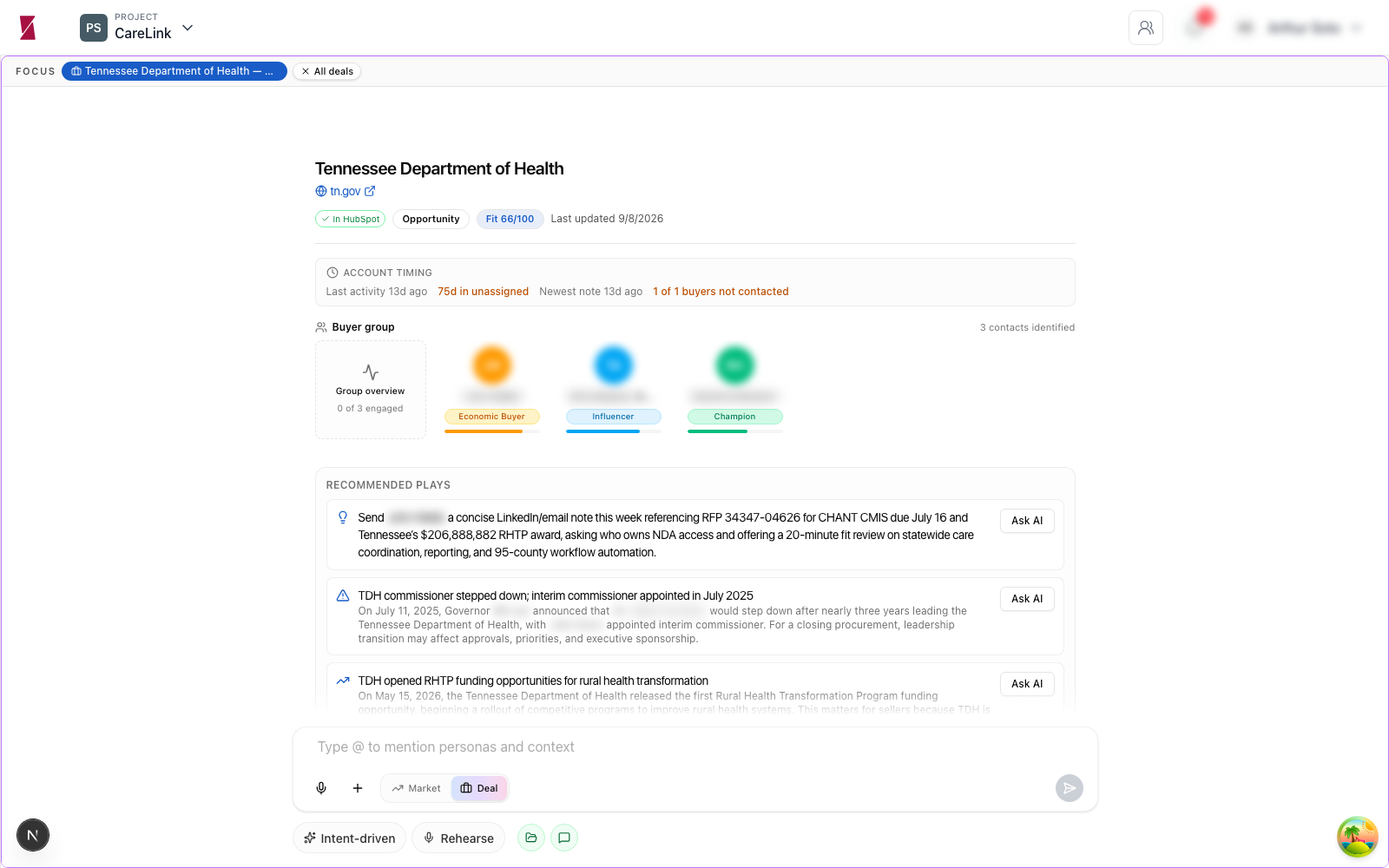
Opening a deal surfaces:
| Element | What it shows |
|---|---|
| Fit score | A 0–100 score (e.g. 85/100) for how well this account matches your ICPs. |
| HubSpot status | Whether the deal is synced, with a one‑click Refresh from HubSpot. |
| Account timing | Last activity date, days in the current stage, and a flag for buyers who haven't been contacted (e.g. "4 of 4 buyers not contacted"). |
| Buyer group | Every contact identified on the deal, each tagged with a buying role — Economic Buyer, Champion, Influencer, and matched to the persona in your Strategy they most resemble. |
| Recommended plays | Specific next moves (e.g. a suggested trial schedule, or "re‑engage [contact], no contact logged yet"), each with an Ask AI button to go deeper on that one play. |
Bottom toolbar
The chat composer in Deal mode adds a row of deal‑specific actions:
Intent‑driven
Steers the advisor toward a specific intent for the conversation rather than open‑ended chat.
Plays
Browse the library of recommended plays directly.
Rehearse
Practice a conversation — e.g. a call with a specific buyer — before you have it for real.
Whole‑pipeline vs. one‑deal chat
Chat in Deal mode always shows which scope it's focused on. Ask a pipeline‑wide question ("what should I focus on today," "which deals are at risk") with no deal selected, or narrow to one opportunity by opening it first — the Deal Advisor pulls a live pipeline summary either way, grounded in stage, value, and buyer‑group data.